

The Accountability Engine for Email
Commitments hide in email.InBoard remembers them.
InBoard continuously tracks the commitments inside your email: who owns them, when they are due, and whether you or someone else needs to move next.
Connect your inbox in under a minute.
Built for professionals who cannot afford to drop a commitment.
Built for people who manage clients, deals, projects, and commitments through email.
Email remembers conversations, not commitments.
A promise made mid-thread does not stay easy to find. Ownership shifts, deadlines move, and waiting status goes stale while your inbox just keeps filling up.
Commitments hide in threads
A promise made mid-conversation gets buried under newsletters, FYIs, and replies that arrived after it.
Ownership is easy to lose
Whoever owes the next move can change mid-thread, and email does not track that shift for you.
Waiting status goes stale
You forget whether you are waiting on someone else or they are waiting on you.
Risk builds quietly
A deadline slips or a reply goes silent, and nothing tells you until it already matters.
One dropped commitment can cost more than the software.
A commitment that quietly slips can mean:
- a frustrated client
- a stalled deal
- a missed deadline
- a relationship that quietly goes cold
InBoard is built to keep the record of what still needs to happen, so that does not happen to you.
Every email updates your accountability record.
InBoard identifies the commitment inside each conversation, assigns ownership, captures timing, and keeps waiting status current as replies arrive.
No folders.
No tagging.
No workflow changes.
Just clarity.
Instead of reorganizing your inbox, you get a running record of what you owe, what you are owed, and what is at risk.
Today’s briefing (example)
A quick snapshot of commitments worth checking.
Your Turn
A commitment where the next move is yours
Waiting on Others
An obligation someone else owes you
At Risk
A deadline or reply that needs attention now
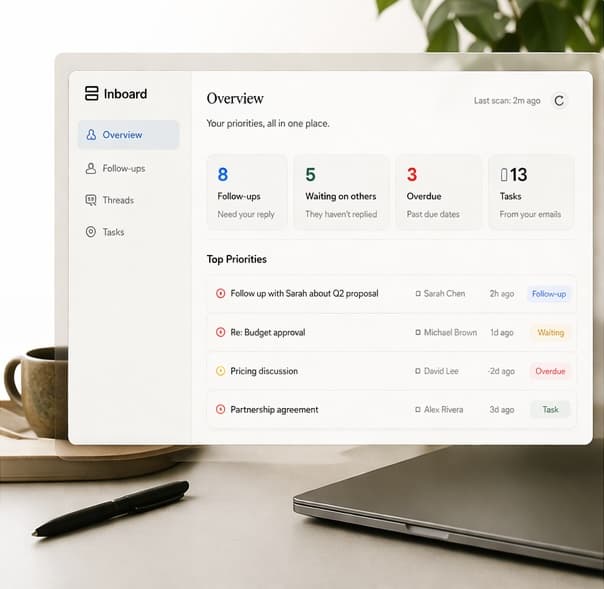
Accountability dashboard
See what you owe, what others owe you, and what is at risk in one place.
Simple controls
Mark commitments complete in a light dashboard, without changing how you use email.
Set up in minutes. No technical work required.
Getting started is simple:
- Create your account
- Connect your mailbox
- Get your first daily briefing
If you can log into your email, you can use InBoard.
No setup.
No configuration.
No workflow changes.
Just connect and go.
Your first few minutes
Works with the inbox you already use.
- 1
Create account
- 2
Connect your mailbox
- 3
See your briefing
What you get with InBoard
Everything you need to stay on top of the commitments that matter, without turning your inbox into a system to manage.
Daily accountability briefing
Morning briefing
A short daily email showing what changed and what matters first.
What changed overnight
New commitments, shifted ownership, and deadlines that moved since yesterday.
At-risk flags
Commitments where delay, silence, or a slipping deadline needs attention.
Commitment tracking
Your Turn
Commitments where the next move is yours.
Waiting on Others
Obligations others owe you while the ball is in their court.
Ownership updates
Responsibility reassigned automatically as replies arrive and threads continue.
Deadline awareness
Timing captured when it appears, and kept current as it changes.
Lightweight workflow
Accountability dashboard
See what you owe, what others owe you, and what is at risk in one view.
14-day catch-up sweep
Reviews recent activity so older commitments are captured, not just new ones.
No workflow changes
Simple controls to mark commitments complete, without turning your inbox into a CRM.
Why this is different from an AI email assistant
AI email assistants are useful for writing and summarizing. Many people use one every day, and still lose track of which commitments actually need a decision.
AI assistants help you understand what was said.
InBoard remembers what still needs to happen.
Most people will use both. They solve different problems.
That is the difference between a writing assistant and an accountability record.
Summarize threads
Yes
Supportive
Draft responses
Yes
No
Track commitments over time
Not the core job
Yes
Identify who owns the next move
Not the core job
Yes
Flag commitments at risk
Not the core job
Yes
Send a daily accountability briefing
Not the core job
Yes
Built to support your judgment, not replace it.
InBoard helps you stay aware of commitments that look at risk, unresolved, or overdue.
It does not replace your judgment, make decisions for you, or promise that every obligation buried in email will surface automatically. What it does is keep a running record of what still needs to happen, so you can act sooner and with more confidence.
Made for people whose commitments live in email.
InBoard is built for people who manage important commitments, ownership, and deadlines through email.
Consultants
Keep client commitments, project updates, and ownership from disappearing across long email threads.
Brokers
Stay on top of renewals, client questions, pending documents, and who owes the next step.
Agency owners
Track client commitments, approvals, and handoffs without adding another CRM process.
Managers
See which commitments are at risk before they become internal bottlenecks.
Founders
Keep investor, customer, vendor, and hiring commitments visible while your attention is split.
Client-facing professionals
Get a clear record of what you owe and what you are owed, so nothing quietly drops.
Especially useful when one dropped commitment can mean a lost opportunity, a frustrated client, or damaged trust.
Work should not disappear because an email got buried.
Join the InBoard waitlist and get early access to a record that remembers the commitments inside your email, so the work that still matters stays visible.
Setup takes less time than reading your morning email.
No contracts. No lock-in. Cancel anytime.

Join the waitlist
For professionals who cannot afford to drop a commitment.
We’re rolling out access in stages. Early users get priority onboarding and direct feedback access.
No spam. We’ll only email when access is available.